
What a bundle means
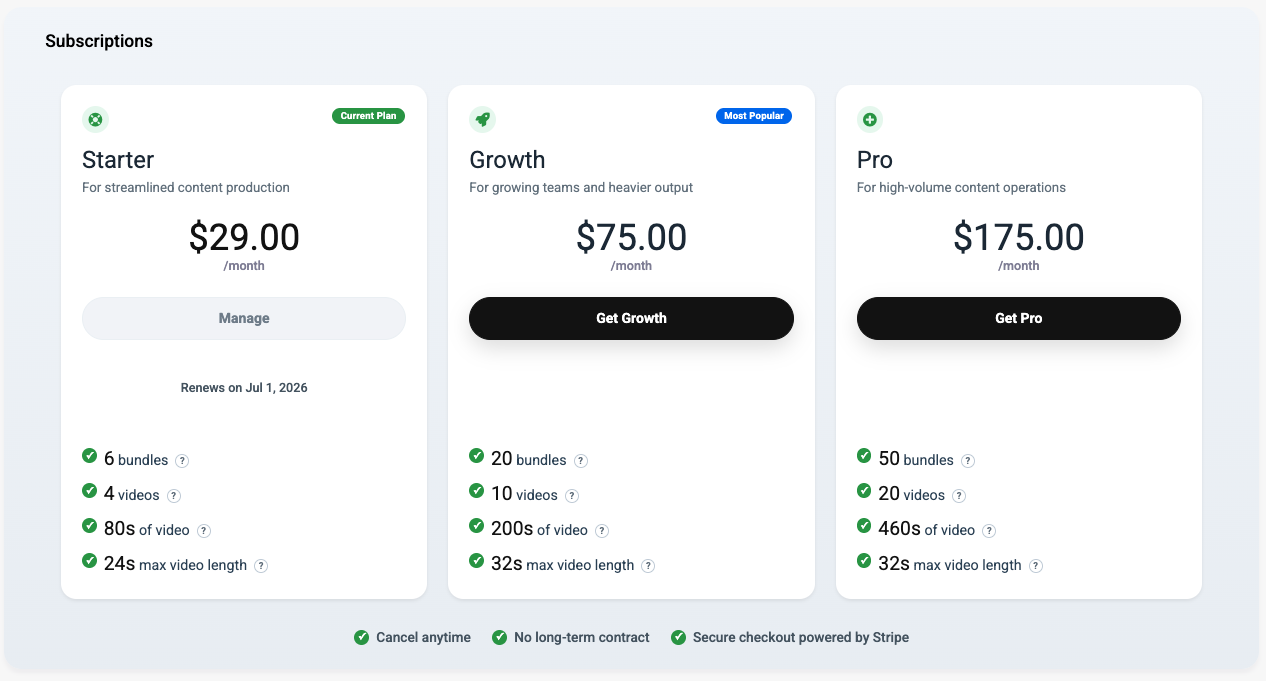
A bundle is the coordinated project workflow that can generate multiple outputs from one idea. Depending on your plan, bundle usage counts against your monthly allowance.
A standard bundle is useful when you want one brief to expand into several deliverables at once, such as social copy, blog content, visuals, and video. That makes bundles a planning unit as much as a usage unit.
Best practice: use bundles for campaigns or concepts that really need multiple output formats. If your goal is only a focused video, a standalone video project is usually the cleaner choice.
Video limits are separate
ContentGenia tracks video availability separately from bundle count. Plans can include limits for the number of videos you can generate, the total number of video seconds per month, and the maximum length of a single video.
This matters because a plan may still have bundle capacity available while video usage is already exhausted. In other words, bundle allowance and video allowance do not always move together.
Best practice: if video is a major part of your workflow, keep an eye on total video seconds and not just the number of bundles you have left.
Why an upgrade modal may appear
When ContentGenia shows an upgrade modal, it is usually responding to a clear plan boundary rather than a bug. The goal is to explain why the current action cannot continue under the existing allowance.
If you are working on video, scene regeneration can also surface these checks because it still counts against your overall video limits.
- 1You have reached the bundle allowance included in your plan. Best practice: finish or publish the outputs you already have before starting a new bundle if you are near the limit.
- 2You have reached the number of videos included in your plan. Best practice: reserve video generation for the projects that need it most, and use text or image outputs separately when appropriate.
- 3You have reached the total video seconds available for the current month. Best practice: shorter, more intentional videos often use allowance more efficiently than repeatedly generating long cuts.
- 4The requested video duration is longer than your current plan supports. Best practice: reduce the target duration or move to a higher plan when you need longer finished videos consistently.